
How Strong Should a Password Be in 2026? A Complete Guide to Creating Secure Passwords
Every day, billions of people sign in to email accounts, online banking, shopping websites, social media, and work applications. Yet one of the biggest security mistakes remains surprisingly common: using weak or reused passwords.
Cybercriminals aren't guessing passwords by hand anymore. They use automated tools capable of testing millions—or even billions—of password combinations against stolen databases. The good news is that creating a password that's extremely difficult to crack isn't complicated once you understand a few key principles.
In this guide, you'll learn what makes a password strong in 2026, why password length matters more than most people realize, and how to protect your online accounts with modern password security practices.
Why Password Strength Matters More Than Ever
Large-scale data breaches have exposed billions of usernames and passwords over the past decade. Once credentials become public, attackers often use automated "credential stuffing" attacks to try the same password across hundreds of websites.
If you reuse passwords, one leaked account can quickly lead to many others being compromised.
A strong password is your first line of defense against:
- Account takeover
- Identity theft
- Financial fraud
- Email compromise
- Social media hijacking
- Business data breaches
While no password is completely unbreakable, a properly generated password can make brute-force attacks practically impossible with today's technology.
What Makes a Password Strong?
A strong password isn't just one with lots of special characters. It combines several important characteristics. Not sure how strong your current password is? Check it with the BetterPass Strength Checker.
1. Length Comes First
If you remember only one thing from this article, remember this:
Length has a greater impact on password security than complexity alone.
Compare these examples:
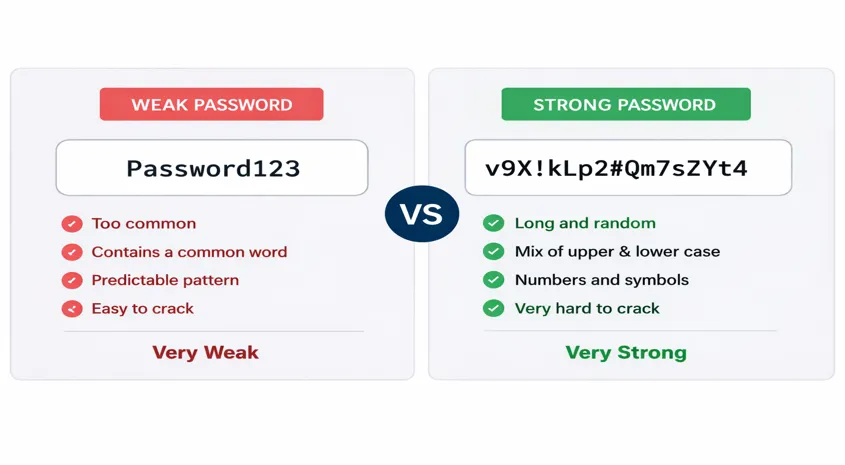
❌ Tiger@12
✅ fQ7#nR2!Lm8@xP4$
The second password is longer and completely random, making it exponentially harder to crack.
Recommended minimum lengths
| Account Type | Recommended Length |
|---|---|
| Basic websites | 12–16 characters |
| Email accounts | 16+ characters |
| Banking | 18–24 characters |
| Password manager master password | 20+ characters (or a long passphrase) |
When a website allows it, choosing 20 characters or more provides excellent long-term protection.
How much entropy does length add?
Randomness is what separates a strong password from a weak one, but length is what makes it practically uncrackable. Here's how brute-force difficulty scales with just a few extra characters:
| Length | Character Space | Entropy (bits) | Crack Time (100B guesses/sec) |
|---|---|---|---|
| 8 characters | 95 ASCII characters | ~52 | ~34 minutes |
| 12 characters | 95 ASCII characters | ~78 | ~34,000 years |
| 16 characters | 95 ASCII characters | ~105 | ~22 trillion years |
Every additional character multiplies the keyspace by the size of the character pool. Going from 8 to 16 characters doesn't just double the difficulty — it increases it by a factor of roughly 44 quadrillion. Try it yourself with the Entropy Calculator.
What is password complexity?
Complexity refers to how many different types of characters a password uses: uppercase letters, lowercase letters, numbers, and special characters. Adding character variety does increase the keyspace an attacker must search. But complexity alone isn't enough — a 6-character password with every special character in the book is still far weaker than a 16-character password using only lowercase letters. The rule of thumb: length first, complexity second.
NIST's SP 800-63 Revision 4 (July 2025) formally backs this up: passwords must be at least 15 characters without MFA, systems must accept up to 64 characters with spaces, forced complexity requirements are being phased out, and mandatory periodic resets are no longer recommended. For a full breakdown of the guidelines, see our passwords vs passphrases guide.
2. Randomness Is Essential
Attackers know people choose predictable patterns such as:
- Password123
- Welcome2026
- John@1995
- CompanyName1
Even though these passwords contain uppercase letters, numbers, and symbols, they're based on common words and patterns. Randomly generated passwords don't follow recognizable structures, making them significantly more resistant to attacks. Use the BetterPass Password Generator to create one instantly.
3. Use Multiple Character Types
A strong password should include a mix of:
- Uppercase letters
- Lowercase letters
- Numbers
- Symbols
Example: 7v@Lm9#Qx2!hRw8$
This increases the possible combinations an attacker must test.
4. Every Password Should Be Unique
Using one password for multiple websites is one of the biggest security risks.
Imagine this scenario:
- Your shopping account is compromised.
- The attacker discovers your password.
- They try the same password on your email account.
- They try it again on your banking website.
Using a unique password for every account ensures that one breach doesn't become many. The BetterPass Password Generator creates unique, random credentials for each site — no reuse required.
How Hackers Crack Passwords
Understanding how passwords are attacked helps explain why strong credentials matter.
Brute Force Attacks
Automated tools test every possible combination until the correct password is found. At 100 billion guesses per second (which is realistic for modern hardware), the keyspace of a 9-character password can be exhausted in hours. Longer credentials dramatically increase the time required — moving from hours to centuries with just a few extra characters.
Dictionary Attacks
Attackers use databases containing millions of common passwords, names, and
phrases. They test entries like password, admin,
sunshine, football, and qwerty
first — because these are the most commonly used.
Passphrases using random word combinations resist this attack type, but passphrases built from common sayings or cultural references are vulnerable.
Credential Stuffing
Instead of guessing, attackers use credentials leaked from previous data breaches and test them across hundreds of other websites. This is why password reuse is so dangerous — one breached shopping account can quickly lead to a compromised email, bank account, or social media profile.
Unique credentials for every account prevent this attack from succeeding.
Social Engineering
Sometimes the weakest point isn't the credential itself — it's the person. Attackers gather information from social media, birthdays, pet names, or public profiles to guess passwords.
Avoid using personally identifiable information in your passwords.
How BetterPass Helps You Create Strong Passwords
The BetterPass Password Generator is designed to create secure passwords using your browser's built-in cryptographic random number generator. That means:
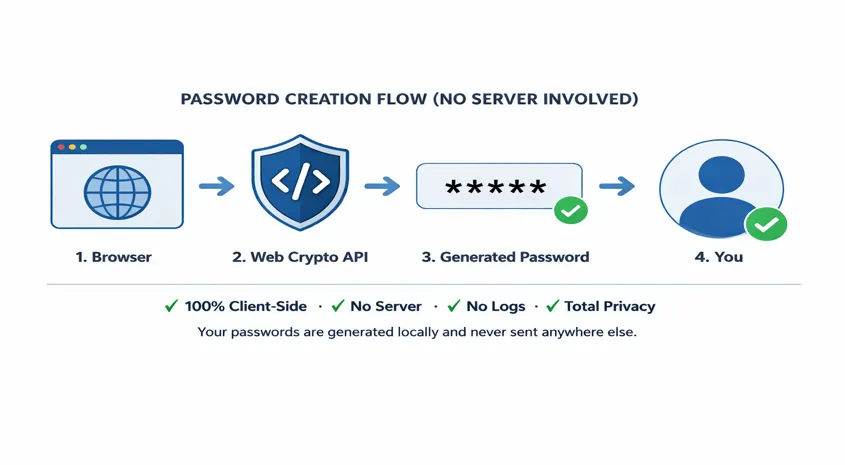
- Passwords are generated entirely on your device.
- No generated passwords are transmitted to BetterPass servers.
- Nothing is stored or logged.
- Passwords are created using the browser's Web Crypto API for high-quality randomness.
Because generation happens locally, you remain in control of your data.
Common Password Myths
"Adding one symbol makes my password secure."
Not necessarily. Password1! is still predictable.
"I'll never be targeted."
Most attacks today are automated. Attackers don't need to know who you are.
Weak passwords can be discovered automatically.
"Changing one letter is enough."
Replacing "a" with "@" or "o" with "0" doesn't significantly improve security.
Password Security Checklist for 2026
Use this checklist to improve your online security:
- Use at least 16 characters whenever possible.
- Generate passwords randomly.
- Never reuse passwords.
- Enable multi-factor authentication (MFA).
- Store passwords in a reputable password manager.
- Replace passwords immediately after a known data breach.
- Avoid personal information such as birthdays, names, or phone numbers.
Final Thoughts
Password security isn't about adding more symbols or making passwords difficult for you to remember. It's about creating passwords that are difficult for attackers to predict.
The simplest way to achieve that is to use long, random, and unique passwords for every account.
If you're creating a new account today, take a few extra seconds to generate a strong password. It's one of the easiest and most effective ways to protect your digital life.
Visit the BetterPass Password Generator to generate secure passwords instantly—right inside your browser, with no passwords sent to any server.
Wondering whether a passphrase is the right choice for your master password? See our passwords vs passphrases guide for a detailed comparison with real entropy numbers.
Frequently Asked Questions
What is the ideal password length in 2026?
For most accounts, 16 characters provides an excellent balance of security
and usability — a random 16-character password using all 95 printable ASCII
characters has approximately 105 bits of entropy, making brute-force
infeasible. For highly sensitive accounts (email, banking, password manager
master), 20+ characters or a 5-word passphrase is recommended. NIST SP
800-63B sets a minimum of 8 characters with no upper limit, but in 2026, 16
should be your baseline for any new password. Longer is always better —
each additional character exponentially increases crack difficulty.
Are password generators safe?
Yes, provided they use a cryptographically secure pseudo-random number
generator (CSPRNG) and run locally on your device. BetterPass uses the Web
Crypto API's crypto.getRandomValues() — the same CSPRNG browsers use for
TLS encryption keys — and generates passwords entirely in your browser with
no server transmission. Avoid password generators that run server-side or
use JavaScript's Math.random(), which is not cryptographically secure.
Always check that the tool processes passwords locally before using it.
Should I use a password manager?
Yes. A password manager is the single most effective tool for improving
your online security. It generates unique, high-entropy passwords for every
account, stores them encrypted behind a single master password, and
auto-fills them on the correct websites — which also protects against
phishing by checking the domain before filling. Without a password manager,
most people fall back to reusing a few memorable passwords, which means one
breached account compromises many others. Top choices include Bitwarden
(free, open-source), 1Password, and KeePass.