
Passwords vs Passphrases: The Complete 2026 Security Guide
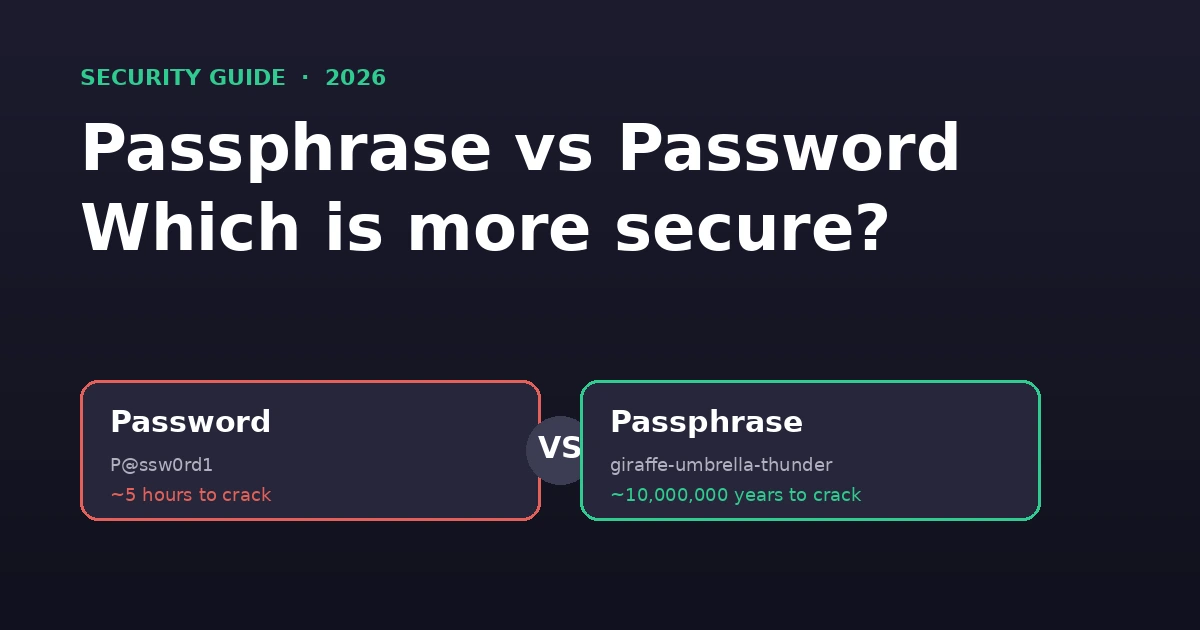
Quick — how many passwords do you have right now? Most people have somewhere around 40, and a good chunk of those are variations of the same word with a "1" or an "!" tacked on the end because some login form demanded it.
That's the real reason the "passwords vs passphrases" debate matters. It's not an academic argument between security nerds. It's about whether the login system you use every single day is actually protecting you, or just making you feel protected while quietly making your life harder.
The rules many of us grew up with — eight characters, one capital letter, one number, one symbol, changed every 90 days — were built on assumptions that haven't held up well. They produced passwords that were hard for humans to remember and, ironically, not all that hard for machines to crack.
In this guide, we'll settle the debate properly: with math, with real-world examples, and with the latest guidance from the organization that literally writes the federal government's security standards.
What Is a Password?
A password is a secret string of characters used to verify your identity. It usually consists of uppercase letters, lowercase letters, numbers, and special characters.
Examples:
P@ssw0rd!9L$kR2!vTA7#sM2!qX9Modern password managers can generate completely random passwords containing 16–32 or more characters. You can also try the BetterPass Password Generator to see how a truly random password looks — it runs entirely in your browser with nothing sent to any server.
The problem isn't passwords themselves — it's how humans create them. We pick predictable words, add a number at the end, substitute "@" for "a", and reuse the same pattern across dozens of sites. Attackers know this.
What Is a Passphrase?
A passphrase is a longer sequence of multiple words, sometimes with numbers or symbols mixed in, that forms something closer to a sentence or phrase.
Examples:
correct-horse-battery-stapleviolet-river-lantern-harbor-coffeesunset-stopwatch-fence-42Unlike passwords, passphrases rely on length rather than character variety for security. They're designed to be both secure and memorable — and in most cases, they succeed at both.
The Short Answer
A passphrase — a string of random, unrelated words — is generally more secure than a traditional short, complex password, and it's easier to remember too. Length beats complexity almost every time, and that's not just an opinion. It's math, and it's also the official position of the U.S. National Institute of Standards and Technology (NIST).
But "generally more secure" doesn't mean "always more secure." A weak passphrase can still be cracked, and a long, random password generated by a password manager can still beat a lazy passphrase. The details matter, so let's dig into them.
Why Length Beats Complexity: The Math Behind It
Here's the part that convinces most skeptics. Password strength against brute-force attacks is a function of the total number of possible combinations, which grows exponentially with length.
Consider this: at 100 billion guesses per second, it would take a computer more than five hundred years to guess all the possible combinations of 15 lowercase letters. That's just lowercase letters — no numbers, no symbols, nothing exotic. Just length.
Compare that to a typical "complex" password like P@ssw0rd1. It looks intimidating with its mixed case, number, and symbol, but at only 9 characters, modern cracking rigs can burn through every combination in that keyspace in a matter of hours — especially since attackers know people substitute "@" for "a" and "0" for "o" as a matter of habit. Complexity rules were designed decades ago to force randomness, but humans are predictable. We almost always add the capital letter at the start and the number at the end, which shrinks the effective randomness far more than the rules intended.
Entropy: Measuring Unpredictability
Entropy measures how unpredictable a credential is, expressed in bits. Higher entropy means better security. You can check the entropy of your own passwords with our Entropy Calculator.
Password entropy:
A random 12-character password using all 95 printable ASCII characters has:
log2(95^12) ≈ 79 bits of entropyPassphrase entropy:
A 5-word passphrase from a 7776-word Diceware list has:
log2(7776^5) ≈ 65 bits of entropyTo match 79 bits with a passphrase:
log2(7776^n) >= 79 → n >= 7 (words)So a 7-word passphrase provides comparable security to a 12-character fully random password.
Entropy at a Glance
| Credential | Length | Character Space | Entropy | Crack Time (100B/s) |
|---|---|---|---|---|
Tr0ub4dor&3 |
11 | Human-chosen patterns | ~28 bits | Instant |
| 8-char random password | 8 | 95 ASCII characters | ~52 bits | Hours |
| 12-char random password | 12 | 95 ASCII characters | ~79 bits | Centuries |
| 5-word Diceware passphrase | ~25 | 7776-word list | ~65 bits | Decades |
| 7-word Diceware passphrase | ~35 | 7776-word list | ~91 bits | Millions of years |
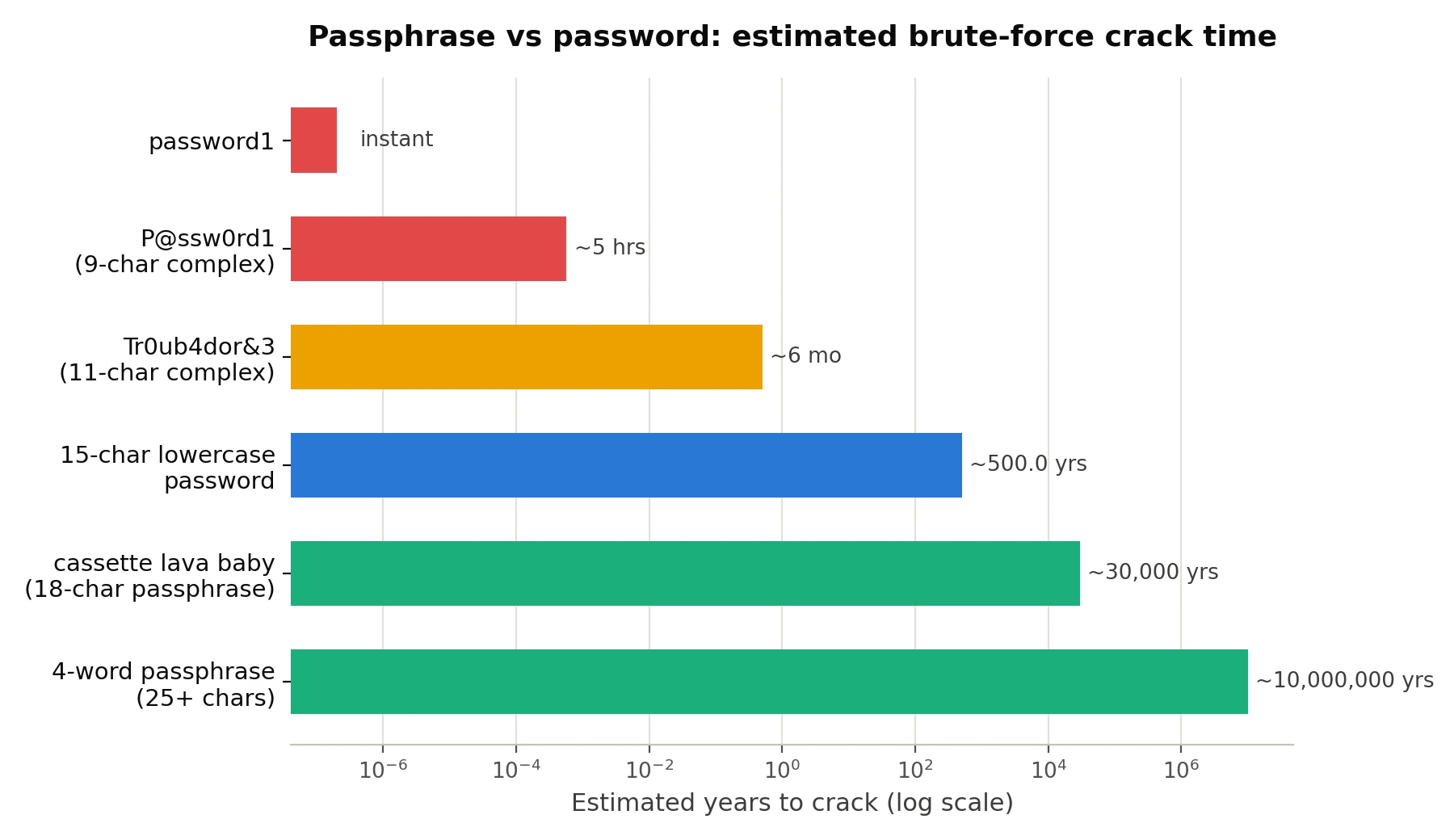
The key takeaway: a passphrase like cassette lava baby sidesteps human predictability entirely. It's 18 characters long, memorable, and random enough to be hard to guess — with zero forced substitutions, zero patterns, and none of the mental gymnastics required to recall which special character goes where.
Passphrase vs Password: Side-by-Side
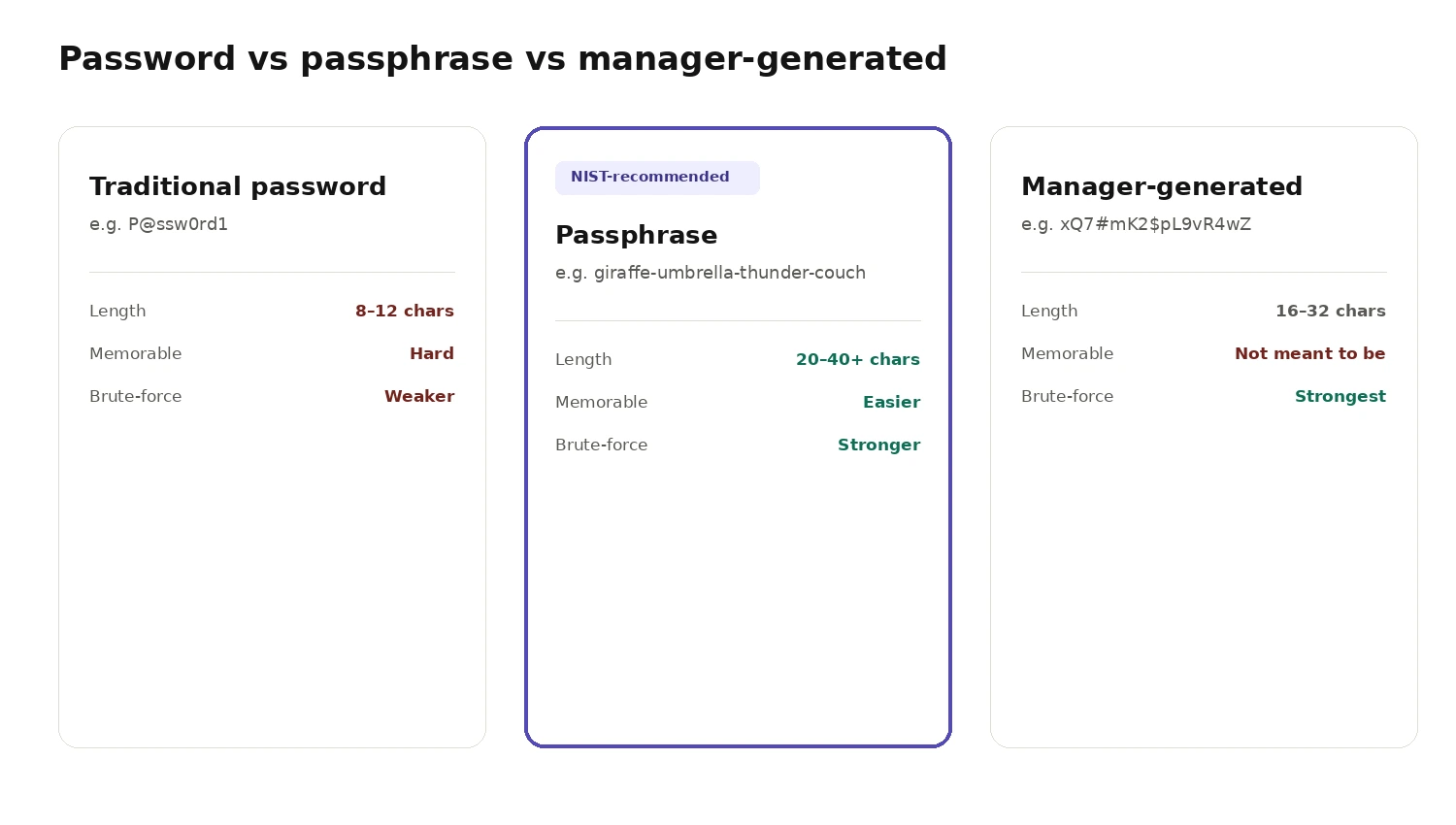
| Factor | Traditional Password | Passphrase |
|---|---|---|
| Typical length | 8–12 characters | 15–40+ characters |
| Memorability | Hard — random substitutions are easy to forget | Easier — built from real words |
| Resistance to brute force | Lower (smaller keyspace) | Higher (larger keyspace) |
| Resistance to dictionary attacks | Moderate, if truly random | Lower if using common phrases; higher with random word combos |
| Typing friction (mobile) | Frustrating (symbols, shift key) | Smoother, especially with spaces |
| Human predictability | High (capital first, number/symbol last) | Low, if words are chosen randomly |
| Current NIST guidance | Discouraged as sole method under 15 characters | Actively encouraged |
How Attackers Actually Crack Passwords
Understanding how passwords are attacked helps explain why strong credentials matter. Attackers use dictionary attacks (testing millions of common passwords), brute-force attacks (systematically testing every combination), credential stuffing (reusing leaked credentials across sites), and social engineering (guessing from personal information). The takeaway: length and randomness matter far more than special characters.
For a detailed breakdown of each attack type and how modern cracking hardware performs in 2026, see our complete guide to password strength.
What NIST Actually Recommends (SP 800-63 Revision 4)
This isn't a fringe opinion. In July 2025, NIST updated its digital identity guidelines with SP 800-63 Revision 4, and the changes amount to a formal endorsement of the passphrase approach. The headline shifts:
- Length now matters more than complexity. If a password is the only login method, it must be at least 15 characters long; if it's used alongside multi-factor authentication, the minimum drops to eight characters.
- Systems must support very long entries. Systems should allow passwords that are at least 64 characters long and accept spaces and printable ASCII characters — which is exactly the room a passphrase needs to breathe.
- Forced complexity rules are on the way out. Requirements to include uppercase letters, lowercase letters, numbers, and special characters are being phased out in favor of any printable characters, including spaces, so users can create strong but natural phrases.
- No more mandatory password resets. Scheduled resets every 60 or 90 days are no longer part of the guidance — changes are only required when there's actual evidence of a breach or compromise. It turns out forcing frequent changes just made people pick weaker, more predictable passwords out of fatigue.
- Blocklisting still applies. New passphrases still get checked against lists of commonly leaked or predictable phrases, so
password1234dressed up as four words doesn't get a free pass.
In short: the organization that literally writes the federal government's security standards looked at the data and concluded that long, simple, memorable phrasing beats short, complicated strings.
For a deeper dive into how these changes affect your specific setup, see our complete guide to password strength in 2026.
The Third Option: Random Password-Manager Passwords
There's a third contender worth mentioning: the fully random string a password manager generates for you, like xQ7#mK2$pL9vR4wZ. These can be extremely strong — arguably stronger than any passphrase, character for character, because every character is truly random rather than drawn from a limited dictionary of words.
The catch is obvious: no human can memorize that. Which is exactly the point. You're not supposed to memorize it — your password manager does.
This is genuinely the best security setup available today:
- One strong passphrase to unlock your password manager (this is the one thing you actually memorize).
- Randomly generated, unique passwords for every other account, stored and auto-filled by the manager.
This combination gets you the best of both worlds — human-friendly memorability where it counts, and inhuman randomness everywhere else.
Where Passphrases Can Still Go Wrong
Passphrases aren't magic. They inherit a weakness that passwords also have: predictability from the human choosing them.
If your "passphrase" is ILoveMyDog2024! or a line from your favorite song, you haven't actually gained much. Attackers now run dictionary and phrase-based attacks that test common sayings, movie quotes, and song lyrics before moving to brute force — because people reuse the same cultural references constantly.
A strong passphrase should be:
- At least four to six words long, ideally 20+ characters total.
- Unrelated to each other — not a grammatically correct sentence, but random words strung together (
giraffe-umbrella-thunder-couch, notThe-Giraffe-Ran-Away). - Not pulled from a known quote, lyric, or saying.
- Unique per account. Reusing even a great passphrase across multiple sites means one breach compromises everything.
A useful trick: use a dice-based word list (like the Diceware method) to generate truly random word combinations, removing your own predictable instincts from the equation entirely. Our Passphrase Generator does this automatically — pick your word count and separator, and it creates a random passphrase locally in your browser.
Passphrase-Specific Mistakes to Avoid
Using Common Phrases
ILoveMyDog2024! or lines from songs are predictable. Attackers test common phrases and cultural references before brute-forcing. If it's something you'd say on social media, it shouldn't be in your passphrase.
Making Them Too Short
A 3-word passphrase from a common word list provides only ~39 bits of entropy — weaker than an 8-character random password. The whole point of a passphrase is length. Four to six random words is the minimum.
Mixing Up "Memorable" and "Predictable"
There's a critical difference between a passphrase you can remember and one that's guessable. The-dog-ran-fast-today is memorable — but it follows a grammatical pattern that dictionary attacks are designed to catch. Random, unrelated words break that pattern.
Forgetting That Length Doesn't Excuse Weakness
A long passphrase isn't automatically strong. password-password-password-password is 36 characters long but trivially easy to crack because it repeats a single dictionary word. Every word in your passphrase should be randomly chosen and unrelated to the others.
For a broader look at password mistakes — including reuse, personal information, and weak random passwords — see our password strength guide.
Step-by-Step: Set Up Your Security Today
If you're deciding what to actually do right now, here's the priority order:
1. Install a password manager. Let it generate and store unique, random credentials for every site. Bitwarden, 1Password, and similar tools handle everything automatically once set up.
2. Create a strong master passphrase. This is the one credential you memorize. Use four to six random, unrelated words, at least 20 characters total. Generate them using a Diceware word list or the BetterPass Passphrase Generator.
3. Turn on multi-factor authentication (MFA) everywhere it's offered. Even a decent password becomes far harder to exploit when a second factor is required. Use an authenticator app or hardware key rather than SMS when possible.
4. Stop changing passwords on a schedule. Only change a credential when you have reason to believe it's been exposed — constant forced rotation, as NIST now confirms, tends to produce weaker choices, not stronger ones.
5. Never reuse credentials across accounts. A single breached site shouldn't be able to unlock your entire digital life. This is what password managers are for.
Frequently Asked Questions
Is a passphrase always safer than a password?
Not automatically — a common phrase or predictable word combo can still be guessed. But a random, sufficiently long passphrase is almost always safer than a short, complex password, and it's far easier to remember.
How long should a passphrase be?
Aim for at least four to six random words, targeting 20+ total characters. Longer is better, and there's little downside since most modern systems accept up to 64 characters.
Can I add numbers or symbols to a passphrase?
Yes, and it doesn't hurt — but it's no longer strictly necessary the way it was under older password rules. The bulk of your security comes from length and randomness, not from squeezing in a "!" at the end.
Should I still use a password manager if I have a good passphrase?
Yes. Use one strong passphrase to protect your password manager, and let the manager generate unique random passwords for everything else.
How many words should a passphrase have?
At least 4–5 words from a large word list (at least 7000 words). Each additional word exponentially increases the passphrase's strength.
Can I use spaces in my passphrase?
Yes. Most modern systems support spaces in credentials, and spaces make passphrases easier to type and remember.
Are passphrases harder to type than passwords?
On desktop, no — typing words is faster than hunting for symbols. On mobile, passphrases are actually easier because you don't need to switch to the symbol keyboard or remember where the shift key is.
The Bottom Line
Both passwords and passphrases have their place in modern security. Passwords generated by a password manager provide excellent security with maximum entropy, while passphrases offer a memorable alternative for credentials you must remember yourself.
The most important rule is to use unique, sufficiently long credentials for every account — whether you choose a password or a passphrase. Pair that with a password manager and multi-factor authentication, and you've covered the vast majority of what actually keeps accounts secure in 2026.
Not sure which approach fits your situation? Our complete password strength guide covers entropy math, attack types, and NIST's 2026 guidelines in detail.
Ready to strengthen your passwords? Use the BetterPass Password Generator to create secure credentials instantly — right inside your browser, with nothing sent to any server.