
What Is Password Hashing? Hashing vs Encryption, Salts, and More
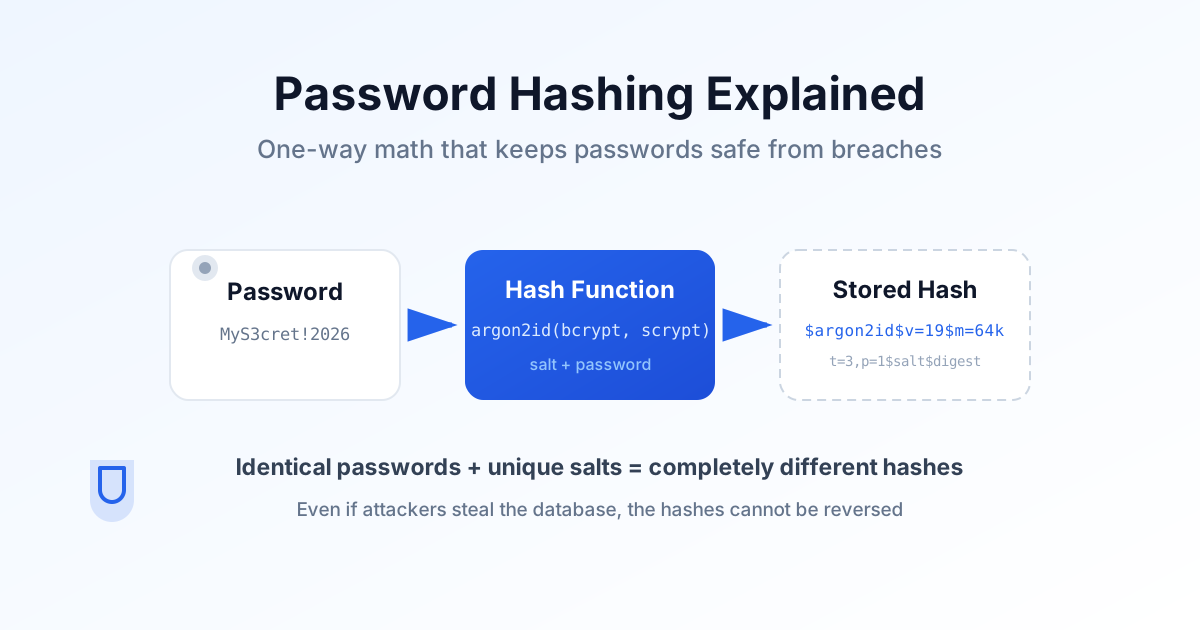
Quick — what happens to your password the moment you click "Sign up"? If you're lucky, it goes through a function called a password hash before it ever touches a database. If you're less lucky, it sits there in plaintext — or behind a fast hash that might as well be plaintext — waiting for a breach to hand it to an attacker.
This guide covers the foundations you need before you ever pick an algorithm: what password hashing actually is, why hashing, encryption, and encoding are three very different things, why salts matter, and why the "secure" hash functions you already know (looking at you, SHA-256) are exactly the wrong tool for the job.
If you already know the basics and just want to make a decision, jump straight to our Argon2id vs bcrypt vs scrypt vs PBKDF2 comparison, or the password hashing best practices and migration guide.
What Is Password Hashing?
Password hashing is a one-way mathematical process that turns any password into a fixed-length string of characters. Unlike encryption, there is no key that can reverse it — the original password cannot realistically be recovered from the hash.
Here's a simplified example:
MySecurePassword2026! → 0d8d92aebcf29c8d...When a user logs in, the flow looks like this:
- The user types their password.
- The server hashes it again using the same algorithm and salt.
- The new hash is compared with the stored hash.
- If they match, the login succeeds.
At no point does the server need to know the original password. That is the entire point: even if an attacker copies the whole database, they end up with values they cannot turn back into passwords.
Why Password Hashing Matters More Than Ever
In 2026, a data breach is a "when", not an "if". The real question is what happens afterward, when an attacker walks away with your user table. Consider three scenarios.
Scenario 1: Plaintext passwords
john@example.com   password123
alice@example.com  football2025
bob@example.com    qwerty987
Every account is compromised instantly. No extra work required.
Scenario 2: Fast hashes like SHA-256
john@example.com
ef92b778bafe771e...

alice@example.com
8d969eef6ecad3c2...
The passwords are no longer visible, but SHA-256 is built for speed — attackers can test billions of guesses per second on modern GPUs. A weak or reused password falls in minutes.
Scenario 3: A dedicated password hash like Argon2id
john@example.com
$argon2id$v=19$m=65536,t=3,p=4...
Now every guess costs significant memory, multiple computation rounds, and real CPU time — and it parallelizes poorly on GPUs. Instead of billions of guesses per second, an attacker is limited to a few hundred or thousand. That gap is the difference between millions of cracked accounts and a handful of weak ones.
Hashing vs Encryption vs Encoding
These three terms get conflated constantly, and the confusion produces real vulnerabilities. Here is the distinction that matters.
| Feature | Password Hashing | Encryption | Encoding |
|---|---|---|---|
| Reversible | No | Yes | Yes |
| Requires a key | No | Yes | No |
| Built for password storage | Yes | No | No |
| Typical example | Argon2id | AES-GCM | Base64, hex |
Encryption is two-way. You protect data with a key and decrypt it later — perfect for payment details, messages, and files. It is wrong for passwords because the decryption key becomes a single point of failure: if an attacker gets both the database and the key, they have everything.
Encoding (Base64, URL encoding, hex) is not security at all. It just changes how data is represented, and anyone can decode it without a secret. If a value can be decoded without a key, it is not protecting a password.
Store passwords with a one-way, deliberately slow hash — never encrypted, never just encoded.
What Makes a Good Password Hashing Algorithm?
Hash functions like SHA-256 are cryptographically sound and fast by design. That speed is precisely why they fail at password storage. A modern password hashing algorithm needs a different set of properties.
Slow by design
A login request can afford tens or hundreds of milliseconds. An attacker guessing billions of passwords cannot. Password hashing algorithms deliberately make each verification expensive so brute-force attacks become economically pointless.
Memory hardness
GPUs crush CPU-bound work. Memory-hard algorithms force every guess to allocate a large chunk of RAM, which cripples GPU efficiency — this is why Argon2id and scrypt resist specialized hardware so much better than CPU-only schemes.
Configurable work factors
Hardware gets faster every year. A good algorithm lets you raise the difficulty (iterations, memory, parallelism) over time without changing the algorithm or your database schema.
Automatic salt support
Salting must be built in, not bolted on — which brings us to the next section.
Salts: Why Every Password Needs Its Own Random Value
A salt is a unique, cryptographically random value generated per password and mixed in before hashing. It exists so that identical passwords never produce identical hashes.
Without a salt, 20,000 users who chose Password123! all share the same hash. An attacker cracks one and recognizes them all, and rainbow tables can be reused across the entire database.
With a unique salt per user, the same password produces completely different hashes:
| User | Password | Salt | Result |
|---|---|---|---|
| Alice | Password123 | Random A | Unique hash |
| Bob | Password123 | Random B | Different unique hash |
Salting blocks rainbow table attacks, prevents hash-sharing between accounts, and forces attackers to crack every password individually. Modern libraries embed the salt inside the stored hash string, so you rarely have to manage it by hand.
Why SHA-256 (and MD5) Are the Wrong Tool
If you take one thing from this guide, make it this: never store passwords with SHA-256, SHA-1, MD5, or any other general-purpose hash — even with a salt. These functions were optimized to be fast, and fast is the enemy of password storage.
Want proof? Run any string through our SHA-256 Hash tool or the Hash Generator — it returns instantly. That same speed is why an attacker can brute-force a SHA-256 password database in hours. MD5 is even worse: it is known to be broken for collision resistance and should never appear in a security context.
Instead, use a purpose-built password hashing algorithm. Dedicated functions such as Argon2id and bcrypt, plus scrypt and PBKDF2, add the deliberate slowness, memory cost, and salting that make a stolen database genuinely hard to crack. This is the same conclusion as the OWASP Password Storage Cheat Sheet: a dedicated, adaptive algorithm — never a general-purpose hash.
Frequently Asked Questions
What is password hashing?
Password hashing is a one-way process that turns a password into a fixed-length string that cannot be converted back into the original. The server stores only the hash, so a leaked database does not expose plaintext passwords.
Why can't I just use SHA-256 to hash passwords?
SHA-256 is cryptographically secure but designed to be extremely fast. Attackers with GPUs can test billions of guesses per second against it. Password hashing algorithms like Argon2id, bcrypt, scrypt, and PBKDF2 are deliberately slow and memory-hungry instead.
What is the difference between hashing and encryption?
Hashing is one-way and cannot be reversed. Encryption is two-way and can be decrypted with the right key. Passwords must be hashed, never encrypted, because an encryption key becomes a high-value target if the database leaks.
What is a salt and why is it important?
A salt is a unique random value added to each password before hashing. It ensures identical passwords produce different hashes, blocks rainbow table attacks, and forces attackers to crack each account individually.
Is encoding the same as hashing?
No. Encoding, like Base64, just changes how data is represented and provides zero security — anyone can decode it without a key. Encoding is not a substitute for password hashing.
Next Steps
Now that you understand the foundations, the practical work begins:
- Compare Argon2id vs bcrypt vs scrypt vs PBKDF2 to pick the right algorithm for your project.
- Follow the best practices, parameters, and migration guide to implement it correctly.
- Not sure how strong a password should be in the first place? Read our complete password strength guide.
- Create and verify credentials with the Password Generator, Strength Checker, and Entropy Calculator.
- Already leaked? Follow our what to do after a data breach guide.